
Industrial Printing Systems: Upgrade or Replace?
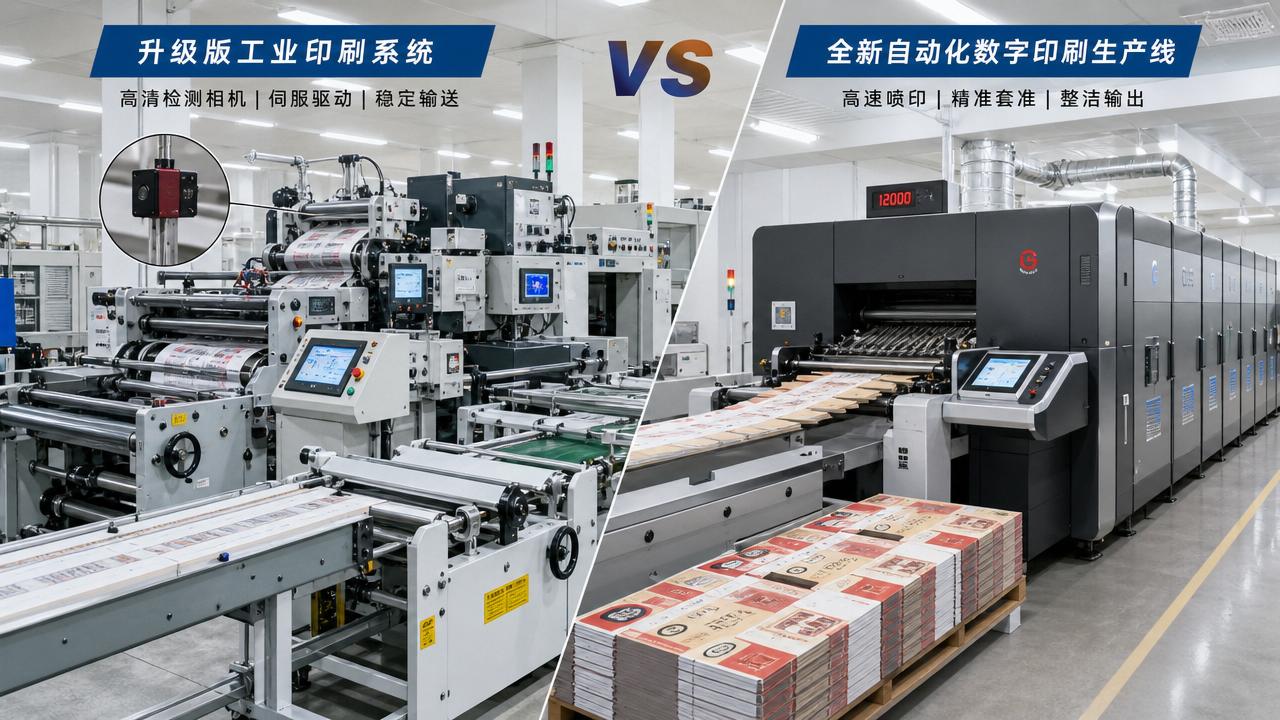
When evaluating industrial printing systems, the biggest question is rarely technical alone. It is a business decision tied to uptime, quality, labor, sustainability, and market responsiveness.
An upgrade may extend value from installed assets. A replacement may unlock speed, automation, and digital flexibility that older platforms cannot realistically deliver.
This guide explains how to compare both paths. It focuses on operational evidence, cost structure, production risk, and long-term competitiveness across modern print and paper workflows.
What does “upgrade or replace” mean for industrial printing systems?
In practice, upgrading industrial printing systems means improving selected subsystems while keeping the main machine platform in service.
Typical upgrades include printhead replacement, drive modernization, dryer optimization, software refreshes, camera inspection, feeder controls, or workflow integration.
Replacement means installing a new system architecture. That often includes a new print engine, new automation logic, updated data handling, and stronger energy performance.
For digital printing, replacement may also deliver higher native resolution, variable data speed, broader substrate tolerance, and better droplet control on coated or corrugated surfaces.
For integrated paper converting lines, the decision can affect upstream web tension, downstream die-cutting timing, glue behavior, inspection accuracy, and overall line synchronization.
A simple definition
- Upgrade: improve parts of existing industrial printing systems.
- Replace: invest in a new production platform.
- Hybrid path: upgrade now, replace later in phases.
When is upgrading industrial printing systems the smarter option?
Upgrading works best when the machine frame remains stable, spare parts are available, and the current process still matches target applications.
If print quality is acceptable but downtime is rising, targeted modernization can restore throughput without the disruption of a full replacement project.
This is common in plants handling repeat jobs, medium customization, and steady substrate mixes. The economics often favor extending useful life.
Good reasons to upgrade
- Mechanical structure is sound.
- Registration issues come from outdated controls, not worn geometry.
- Energy use is high, but dryer or motor retrofits can improve it.
- Production software lacks connectivity, yet the press still performs well.
- Market demand is growing slowly, not suddenly.
A practical example is an older corrugated print line with stable mechanics but weak inspection and inconsistent tension feedback.
Adding camera systems, closed-loop controls, and better servo drives may improve waste, setup time, and repeatability at a fraction of replacement cost.
When should industrial printing systems be replaced instead?
Replacement becomes necessary when core limitations cannot be solved through retrofit. That usually appears in speed ceilings, obsolete electronics, and incompatible workflow architecture.
If jobs require faster changeovers, higher personalization, shorter lead times, and stronger sustainability reporting, older industrial printing systems may create structural bottlenecks.
Another warning sign is rising hidden cost. Frequent stoppages, operator workarounds, and unstable quality often cost more than maintenance reports suggest.
Strong signals for replacement
- OEM support is limited or discontinued.
- Critical boards, drives, or controllers are difficult to source.
- Color consistency fails modern brand requirements.
- Current equipment cannot support variable data or smart workflow integration.
- Sustainability targets require lower energy, less waste, or safer chemistry.
In digital packaging, replacement may also be the only realistic path if image quality on challenging paper surfaces remains unstable at production speed.
That matters where e-commerce packaging, personalized FMCG runs, and branded corrugated output demand sharper data control and cleaner finishing handoff.
How do cost, downtime, and ROI compare?
The purchase price never tells the full story. Decisions about industrial printing systems should compare lifecycle cost, conversion loss, labor impact, and revenue opportunity.
An upgrade usually requires lower capital and shorter installation time. However, it may preserve older process constraints and deliver only incremental gains.
A replacement demands more planning, validation, and commissioning. Yet it can reduce total cost per job through automation, waste reduction, and faster changeovers.
Key ROI factors to calculate
- Current and future uptime percentage.
- Makeready time and substrate waste.
- Labor hours per shift and training burden.
- Energy, ink, glue, and consumable efficiency.
- Ability to win new jobs or reduce outsourcing.
If a new platform enables premium applications, the ROI model should include margin expansion, not only maintenance savings.
That is especially important in sectors shaped by rapid artwork changes, barcode accuracy, short-run packaging, and sustainability-driven specification changes.
FAQ comparison table
Which technical factors matter most before deciding?
A sound decision starts with evidence from the line. Production data should show where losses occur and whether they are fixable within the existing architecture.
For industrial printing systems, five technical areas usually define the answer: print quality, transport stability, automation capability, software connectivity, and maintainability.
Technical checklist
- Can the press hold registration across target speed ranges?
- Does web or sheet handling support lightweight and recycled materials?
- Are data systems ready for MIS, ERP, and inspection feedback?
- Can spare parts support another five to eight years?
- Will upgrades create compatibility problems later?
Material trend matters too. Recycled papers, fiber variability, and sustainable packaging formats place more stress on tension control and finishing consistency.
If current industrial printing systems struggle with these materials, replacement may reduce future risk even if present demand still looks manageable.
What common mistakes distort the decision?
One common mistake is using maintenance spend alone as the trigger. A low repair bill can hide serious opportunity loss from slow speed or missed application capability.
Another mistake is chasing a full replacement before process discipline improves. Poor workflow, weak color management, or unstable substrates can undermine any machine.
Risk reminders
- Do not compare only headline capital cost.
- Do not ignore training and ramp-up time.
- Do not assume every retrofit is scalable.
- Do not overlook compliance and sustainability reporting needs.
A disciplined review should include current OEE, reject rates, substrate range, software limitations, and future application mix for all relevant industrial printing systems.
That broader view creates a decision based on production reality, not only budget pressure or vendor preference.
How can the decision be turned into a practical roadmap?
Start with a three-layer review. First, document technical bottlenecks. Second, model financial outcomes. Third, match the result to market requirements over the next three to five years.
If the gap is narrow, staged modernization may be ideal. If the gap is structural, replacement is often the safer long-term move.
Recommended next steps
- Audit existing industrial printing systems using downtime and quality data.
- Define target applications, speed, and sustainability requirements.
- Compare retrofit scenarios with full replacement scenarios.
- Estimate payback using both savings and revenue growth.
- Plan commissioning, operator training, and process validation.
The best decision for industrial printing systems is not automatically the cheaper or newer one. It is the option that supports stable output, future demand, and operational resilience.
Use measurable production evidence, realistic ROI assumptions, and a clear technology roadmap. That approach turns a difficult equipment choice into a strategic advantage.
Industry Briefing
Get the top 5 industry headlines delivered to your inbox every morning.
Recommended News